
Among businesses of all sizes, Power BI has become one of the most popular business intelligence solutions. In fact, working with a professional Power BI consulting company to make dashboards, automate reports, and enhance decision-making has become the norm for many companies.
However, the price of Power BI could vary significantly based on elements like the type of license, number of users, complexity of implementation, data sources, and the usage of consulting support. A Forrester study reports Power BI can deliver 366% ROI over three years. To some extent, knowing these cost factors allows companies to plan their budgets accurately and be prepared for potential additional costs.
It’s essential for a business to consider not only the initial costs of implementation but also the recurring subscription fees to have a comprehensive understanding of Microsoft Power BI costs over time.
What Is Power BI and Why Do Businesses Use It?
➔ Power BI as a Business Intelligence Tool
Power BI is capable of taking raw data from business operations and transforming it into easily understandable insights through interactive reports, dashboards, and data visualizations. Besides that, many businesses have adopted Power BI consultancy as their preferred data analysis tool to track the progress of sales and financial figures, examine operations and customer behavior, and measure the effectiveness of marketing campaigns, all from one place.
With Power BI, businesses can:
• Keep an eye on the KPIs as they happen
• Make the reports more accurate
• Get rid of the need for manual data entry in reports
• Encourage quicker responses from decision-makers
• Create a single source of truth for all corporate information
➔ Who Uses Power BI?
Power BI is utilized by:
• New startups and small businesses
• Medium-sized businesses
• Large organizations
• Finance divisions
• Marketing and sales teams
• Operations groups
• Leaders and senior executives
Its great adaptability has made it a perfect fit for even the most straightforward reporting needs as well as complex enterprise analytics.

Main Factors That Affect Power BI Cost
Many elements have an impact on the final cost of Power BI.
➥ Number of Users
More users needing access means licensing fees will go up. Creators, viewers, and administrators may each require a different kind of license.
➥ Type of Power BI License
The licensing options offered by Microsoft include Free, Pro, Premium Per User, and capacity-based types. The suitable option will be determined by the needs for sharing, the size of datasets, access to advanced features, and the overall user count. More integrations generally increase the cost of Power BI implementation.
➥ Data Source Complexity
If Excel is the only data source, then it is a low-cost project, but if it involves implementing multiple data sources such as a CRM, ERP, database, API, and cloud applications, then the implementation effort and cost will go up.
➥ Dashboard and Report Complexity
Simple, straightforward dashboards can be built very quickly. However, highly detailed reports with drilldowns, scheduling, security roles, and custom KPIs take more time to develop.
➥ Consulting and Implementation Support
Use of an external consultant for a new system setup, dashboard design, user training, and governance planning may result in a higher total project cost. The level of support required significantly affects the overall cost for Power BI deployment.
Also Read: List of Power BI Analytics Services for Business Intelligence Implementation
Power BI License Costs Explained
◈ Power BI Free
The Free edition is targeted towards individual users who are Power BI beginners or personal report authors.
The use cases are:
• Learning Power BI
• Personal reporting
• Basic analysis
• Individual dashboards
However, sharing and collaboration capabilities are limited. Many businesses use this option during initial testing before engaging a Power BI consultancy partner.
◈ Power BI Pro
The most widely used corporate license for sharing and collaborating on reports is Power BI Pro.
It is best suited for:
• Team report generation
• Shared dashboards
• Departmental analytics
• Small and medium-sized businesses
◈ Power BI Premium Per User
Benefits of Premium Per User include the following advanced options:
• Support for bigger data models
• Integration of AI features
• Advanced analytics
• Enhanced performance
It is mainly used by the finance and analytics departments of companies.
◈ Power BI Capacity-Based Pricing
Capacity-based pricing is targeted at large companies and providers of analytics services embedded into their apps.
Typical scenarios:
• Corporate reporting
• Portal for customers
• SaaS offerings
• Large communities of users
• Embedded dashboards
Power BI Setup Cost: What Businesses Usually Pay For
The cost of the Power BI rollout may vary according to the set-up activities that are mandatory before the dashboard launch. Getting a clear picture of the cost of Power BI implementation enables companies to properly allocate their budget.
⇒ Requirement Analysis
The initial phase is the one where the main objectives of a company, the desired kinds of reports, KPIs to be monitored, and potential users are discussed and decided. This way, the scope of the project can be finalized, and the development phase will be more cost-efficient and effective.
⇒ Data Connection and Integration
Power BI has the capability to link to data from Excel, SQL databases, CRM systems, ERP platforms, cloud applications, and APIs. The bigger the parts and the more data sources involved, the higher the cost of Microsoft Power BI implementation will be.
⇒ Data Cleaning and Transformation
Reporting the most reliable dashboards and KPIs is only possible after data cleansing, which involves eliminating duplicates, rectifying errors, and enhancing the overall data integrity.
⇒ Data Modelling
This is done to make the report generation accurate and efficient by setting up table relationships, creating DAX measures, and making calculated columns.
⇒ Dashboard Design and Development
During this phase, the working tools such as dashboards, reports, charts, KPIs, filters, and interactive visualizations are implemented. The development of complex dashboards usually results in higher Power BI costs.
⇒ Testing and Deployment
Afterward, the accuracy of reports, the timely updating of data, and KPIs through the testing phase help verify the assurance level of business reporting.
Power BI Consulting Fees Explained
To reduce the risk of a poor implementation and speed up the rollout, many companies hire consultants.
➔ What Does a Power BI Consultant Do?
Generally speaking, a consultant helps with the following:
• Setting up data integration
• Creating dashboards
• Designing data models
• Writing DAX formulas
• Training users
• Providing ongoing support
➔ Common Power BI Consulting Pricing Models
Typically, projects go for one of the following price structures:
• Charging by the hour
• Project fixed price
• Monthly fees for support
• Dedicated resources model
• Comprehensive end-to-end implementation packages
An experienced Power BI consulting company can help businesses choose the most suitable engagement model.
➔ When Should You Hire a Power BI Consultant?
If you:
• Rely heavily on Excel reports
• Have to set up multiple integrations
• Need automation
• Don’t have good Power BI skills in-house
Investing in Power BI consulting often improves dashboard quality while reducing implementation time.
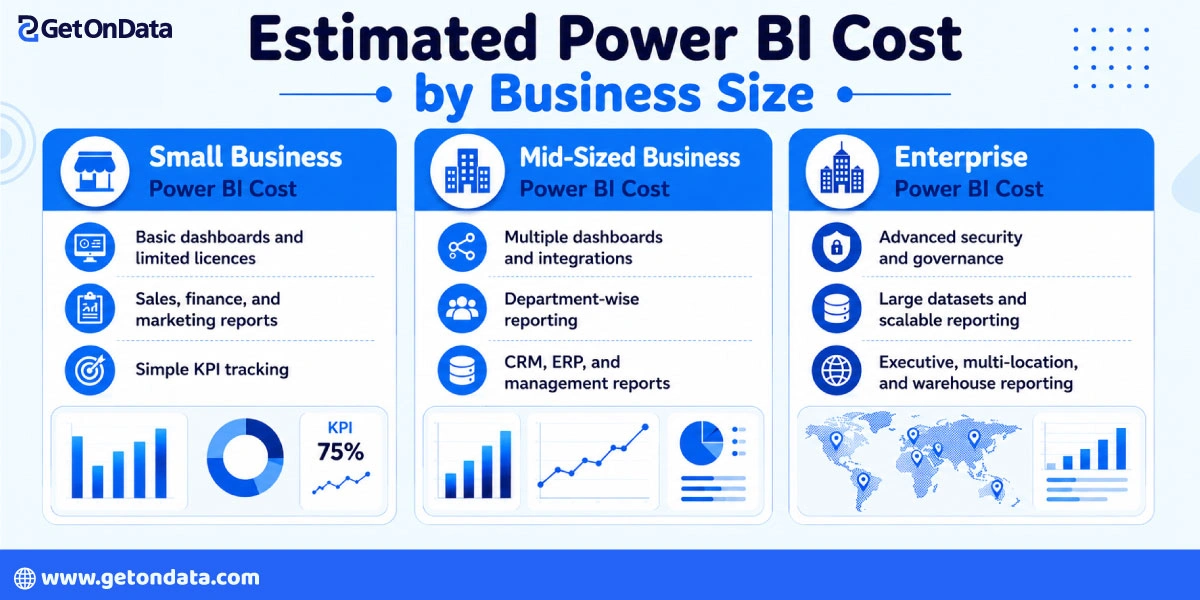
Estimated Power BI Cost by Business Size
The total cost will depend on the size of the business and the extent of reporting that is required.
✦ Small Business Power BI Cost
Small businesses generally need:
• Basic dashboards
• Limited integrations
• Small user groups
• Sales and finance reporting
• Such projects are quite affordable.
✦ Mid-Sized Business Power BI Cost
Mid-sized businesses usually need:
• Usage of numerous dashboards
• Report generation for the different departments
• CRM system integrations
• ERP reporting
• Executive dashboards
Additional user licenses and integrations contribute to the Microsoft Power BI cost increase.
✦ Enterprise Power BI Cost
Large companies, in general, require:
• High-level security
• Data governance
• Big data sets
• Data warehouses
• Embedded analytics
• Reporting across multiple locations
Enterprise-level engagements entail high costs but generate substantial value.
One-Time Power BI Setup Cost vs Ongoing Cost
Having a clear picture of initial and continuing costs assists companies in coming up with the total cost of ownership estimation.
➨ One-Time Setup Costs
Generally speaking, one-time costs consist of:
• Requirements gathering
• Data integration
• Dashboard development
• Data modeling
• Testing and deployment
• Initial training
➨ Ongoing Monthly Costs
Regular expenses may include:
• License subscriptions
• Dashboard maintenance
• Data refresh monitoring
• Report updates
• New KPI additions
• User support
Hidden Costs Businesses Should Consider
Many companies overlook costs, especially apart from licensing.
❖ Data Preparation Cost
Substandard data results in extra work and extended project delivery times.
❖ Training Cost
Training may be necessary for the following:
• Dashboard navigation
• KPI interpretation
• Use of filters and slicers
• Creating reports independently
❖ Maintenance Cost
Changing business needs necessitate that updates be made to reports, KPIs, and data integrations.
❖ Security and Access Management Cost
Companies that handle confidential information may need:
• User rights
• Data governance
• Compliance controls
• Audit trails
How to Reduce Power BI Costs Without Compromising Quality
One way to reduce Power BI cost is to plan a strategic implementation to help make powerful and dependable report building possible.
☑ Start with Clear Reporting Goals
Identify the business objectives, dashboards, and KPIs that will have the biggest impact at the start of the project. Working on the reports that are really necessary will help in keeping away from the combination of features, which would not only result in cost savings but would also decrease the efforts of the implementation.
☑ Choose the Right License Type
Choose the best Power BI company depending on the users and their needs for the reports. Buying licenses that correspond to the roles of users will save businesses from paying for advanced features that they might not even need.
☑ Clean Your Data Before Implementation
If the data is accurate and well-arranged, it brings down the setup time, normalizes the data modeling, and increases the accuracy of the dashboards. Therefore, spending time on data preparation will help in substantially reducing the implementation cost and supporting future maintenance efforts.
☑ Build Dashboards in Phases
Initially, build only the indispensable dashboards that give the greatest business value, and then, step by step, you can introduce other reports and features. Besides these, the phased method also assists in spreading the costs, mitigates the risks of the project, and allows businesses to change the reporting format as per their changing needs.
Also Read: Top-Rated Power BI Partners in India Offering End-to-End BI Solutions
Power BI Cost Comparison: DIY vs Hiring a consultant
The decision is most often between an in-house team and external expertise support.
⦿ DIY Power BI Setup
The pros are:
• Less initial investment
• Better internal control
• Good for straightforward use cases
Cons:
• Understanding the data model
• Developing DAX measures
• Setting up governance
• Optimizing performance
⦿ Hiring a Power BI Consultant
Power BI experts can offer:
• Rapid deployment
• Higher quality dashboard design
• More reliable reporting
• Strong governance
Working with Power BI experts can also reduce implementation risks and improve long-term ROI.
How to Choose the Right Power BI Plan for Your Business
Picking the right license type helps a business keep its costs down while still being able to perform all the necessary functions. Many organizations also work with the best Power BI company to identify the most cost-effective licensing strategy and avoid unnecessary spending.
⊛ Questions to Ask Before Choosing a License
Among the things the organization should take into account are:
▶ How many users require access?
▶ Who is responsible for creating reports?
▶ Who only views dashboards?
▶ Are reports shared?
▶ What is the size of the datasets?
▶ Is the usage of advanced analytics necessary?
▶ Is there a need for embedded reporting?
⊛ Best License Choice by Use Case
Here is a guide:
• Individual usage: Power BI Free
• Teamwork: Power BI Pro
• Data scientists and analysts: Premium Per User
• Business-wide reporting & embedding: Capacity-based
Is Power BI Worth the Cost?
Most companies find that Power BI consultancy provides great value for the money.
✤ Business Benefits of Power BI
Power BI serves the following purposes for businesses:
• Saving time on the preparation of reports
• Enhancing business insight and visibility
• Going paperless and/or spreadsheet-free
• Enabling rapid decision-making
• Providing a single source of truth
✤ ROI of Power BI
Some of the returns on investment organizations include:
• Accelerated reporting
• More accurate monitoring of KPIs
• Lower incidence of errors
• Higher productivity
• Accurate forecasting
Proper implementation often brings monetary gains by increasing operational efficiency.

Get Expert Guidance on Power BI Licensing and Setup
The selection of the most suitable Power BI license depends on business objectives, present reporting requirements, and potential growth plans. Collaborating with a seasoned Power BI consulting firm not only helps companies steer clear of unnecessary expenses but also aids in maximizing the attained value.
If you ever find yourself in the market for implementation support, dashboard building, data modeling, automation, or regular maintenance, joining forces with proficient Power BI experts can enhance your reporting quality and speed up the overall deployment.
Effectively leveraging the proper approach and partnering with the best Power BI company, enterprises can concurrently lower costs related to Power BI, boost the report production process, and make decisions grounded in robust data analytics.

