
Tableau is one of the leading business intelligence and data visualization platforms; it helps organizations turn data from multiple sources into interactive dashboards and real, usable insights. Still, buying Tableau licenses is just one piece of the whole thing. A smooth deployment really needs careful planning, data integration that actually sticks, dashboard development, security configuration, user training, and ongoing improvement through professional Tableau implementation services.
If it’s well planned, the implementation can actually bring measurable business gains. In the 2026 Total Economic Impact study, organizations reported saving roughly $3.1 million over three years by replacing older business intelligence tools. Along with that, they described better productivity and decisions made sooner, with more context and clearer insight.
Even with those advantages, the price of implementing Tableau changes a lot from organization to organization. Things like company size, the setup or deployment model, how complicated the data is, integrations, security expectations, and basically the number of users all influence the final spend and investment.
This guide explains the full price of a Tableau implementation in 2026, breaks down major pricing parts, and points out hidden costs that people miss. It also shares practical budgeting guidance, so you can more accurately guess the overall cost for a successful Tableau implementation.
How Much Does Tableau Implementation Cost in 2026?
In 2026, the Tableau implementation cost usually ranges from around $8,000 to more than $100,000, depending on the project scope and the business requirements. The pricing tends to be shaped by the number of users, dashboards, data sources, integrations, and even the deployment model itself. It also changes with implementation complexity, like how tangled the environment is. Smaller companies often see lower costs, while enterprise initiatives typically need a much bigger investment because of advanced analytics, stronger governance, and large-scale integrations.
◈ Tableau Implementation Cost by Business Size
➔ Small business implementation
Small businesses usually spend around $10,000 to $40,000 on a Tableau setup. That money is mostly for the yearly license, the first dashboard build, plus data integration, platform tuning, and some baseline user education. In practice, the whole effort tends to serve just a smaller group of users, with attention on the most important business reporting needs.
➔ Mid-sized business implementation
For a mid-sized organization, the total cost of ownership can be around $80,000 to $160,000 in 2026. The price tends to increase because you usually end up with several departments, more dashboards here and there, integrations tied to CRM or ERP systems, plus stricter security controls. On top of that, broader user adoption across the whole business tends to push the numbers higher too.
➔ Enterprise implementation
An enterprise Tableau implementation usually lands somewhere around $150,000 to well beyond $1,000,000 in the first year. For large-scale deployments, you typically need more elaborate data architecture, enterprise governance, heavy-duty data processing, wide integrations, custom analytics, and ongoing support for literally hundreds or even thousands of users.
➔ Multi-department or global implementation
When organizations implement Tableau across multiple departments, or across global locations, they should plan for roughly $150,000 up to more than $1,000,000 in the first year. Such implementation usually includes regional data sources, multilingual reporting, role-based security, plus compliance obligations. There’s also the need for high availability infrastructure and ongoing optimization, as well as constant refinement to keep business operations running smoothly around the world.
◈ Tableau Implementation Cost by Project Complexity
➔ Basic dashboard implementation
Basic dashboard implementation is about using standard visualizations, a small set of data sources, and minimal customization. The Tableau implementation cost is usually lower since these kinds of projects need less development effort, a simpler integration process, and shorter deployment timelines.
➔ Moderate analytics implementation
Moderate implementations can include dashboards, plus interactive reports, also automated data refreshes and even some integrations with business applications. But once you add more development time, testing sessions, and configuration, the whole project tends to get more tangled, and that usually pushes the implementation costs higher than what you’d see with basic deployments.
➔ Advanced enterprise analytics
Advanced enterprise projects support handling large datasets, predictive modeling, role-based security, governance frameworks, and reporting across the organization. These setups need seasoned specialists, a lot of planning, and performance optimization to satisfy those tricky business requirements.
➔ Embedded analytics and custom Tableau solutions
Working on embedded analytics can mean taking Tableau dashboards and tucking them into web portals, customer apps, or even enterprise software, with a combination of APIs and custom development. In practice, these solutions tend to be tailored, so they need extra engineering time and care, and that’s why they’re often among the most expensive Tableau implementation efforts.

Tableau Implementation Cost Breakdown
✧ Tableau License Costs
License costs depend on the number of users in the roles of Creator, Explorer, and Viewer, plus it also changes if the company goes for Tableau Cloud or Tableau Server. Then there is the whole thing about subscription renewals and future growth for users; these should be taken into account too when you’re estimating the long-term licensing expenses.
✧ Tableau Consulting and Implementation Fees
Professional Tableau consulting services usually include business needs analysis, solution design, platform configuration, the dashboard creation, QA testing, deployment, and project tracking. An experienced consultant helps lower implementation risks, while also making sure the whole system fits with actual business goals.
✧ Data Preparation and Integration Costs
So basically, data preparation is about connecting up existing business systems, then cleaning the inconsistent data, doing dataset transformations, creating ETL pipelines, and integrating everything into the data warehouses, and enabling automated or real-time data refreshes so reporting stays accurate.
✧ Tableau Dashboard Development Costs
Dashboard development spending tends to shift depending on how many dashboards you need, how intricate the visuals are, plus how many calculated fields show up, as well as parameters, interactive filters, drill-down functionality, and even the level of mobile optimization required by different business users.
✧ Tableau Server or Cloud Setup Costs
The costs for deployment aren’t just about turning things on, like configuring Tableau Cloud or installing Tableau Server; you’re also provisioning infrastructure, security controls, handling user access, setting up backup strategies, and establishing disaster recovery processes too.
✧ Training and User Adoption Costs
Training budgets should really account for administrator education, developer training, plus end-user onboarding, and also include technical documentation. Don’t forget knowledge transfer sessions and the change-management activities too, because the goal is to help with platform adoption across the whole organization in a smoother way.
✧ Ongoing Support and Maintenance Costs
Ongoing maintenance covers things like dashboard monitoring, performance optimization, platform upgrades, technical support, security improvements, bug fixes, and enhancement requests so that things stay stable, with reliable performance and long-term business value.
Also Read: Best Tableau Consulting Companies in India (Edition 2026)
Key Factors That Affect Tableau Implementation Cost
➥ Number of Tableau Users
The total number of Creators, Explorers, Viewers, and outside users really impacts licensing costs and administration expenses. When user numbers increase, organizations end up needing extra licenses, better governance controls, more user administration, and extra infrastructure so the platform performance stays steady and reliable.
➥ Number and Type of Data Sources
When you connect Excel files, CRM platforms, ERP systems, cloud databases, data warehouses, and third-party APIs, the setup effort usually goes up. In fact, each additional data source needs its own configuration, validation, testing, and regular maintenance, which overall adds to the Tableau cost, and it can feel a bit heavier than people expect.
➥ Data Volume and Quality
Large datasets, historical records, sometimes inconsistent information, and frequent refresh demands push teams toward more data cleansing, transformation, and optimization. With higher data volumes, you usually need stronger infrastructure and more focused performance tuning so the dashboard can still stay reliable, even when things get heavy and busy.
➥ Dashboard Complexity
A simple dashboard needs less work than a setup that has advanced calculations, predictive analytics, custom visualizations, and even real-time reporting. When the design gets more tangled, the build usually takes longer, plus the testing requirements get heavier, and the whole optimization phase across the implementation lifecycle starts to cost more.
➥ Integration Requirements
Integrating Tableau with Salesforce, SAP, Microsoft Azure, Snowflake, Google BigQuery, and other big enterprise applications really needs specialized skill. A lot of the time, these complicated integrations require bespoke connectors, API development, authentication setup, and then ongoing care after the go-live.
➥ Security and Governance Requirements
Role-based access control, row-level security, and other data privacy, compliance, and governance requirements increase the complexity of the design and implementation. Organizations with more stringent compliance requirements have longer implementation timelines and higher costs associated with deployment.
➥ Deployment Model
The type of deployment model used also impacts the design and implementation of the system. Implementing Tableau Cloud reduces the complexity of management, control, and maintenance as compared to Tableau Server. A hybrid environment and embedded analytics add more complexities with respect to configuration, control, management, and operations.
➥ Implementation Team and Expertise
The knowledge and skill of the implementing team directly impact the success of the project. In-house staff, freelancers, offshore staff, a local company, or a certified Tableau consulting company, when used, minimize the risk of the project, improve the quality of the implementation, and accelerate the time to deployment.
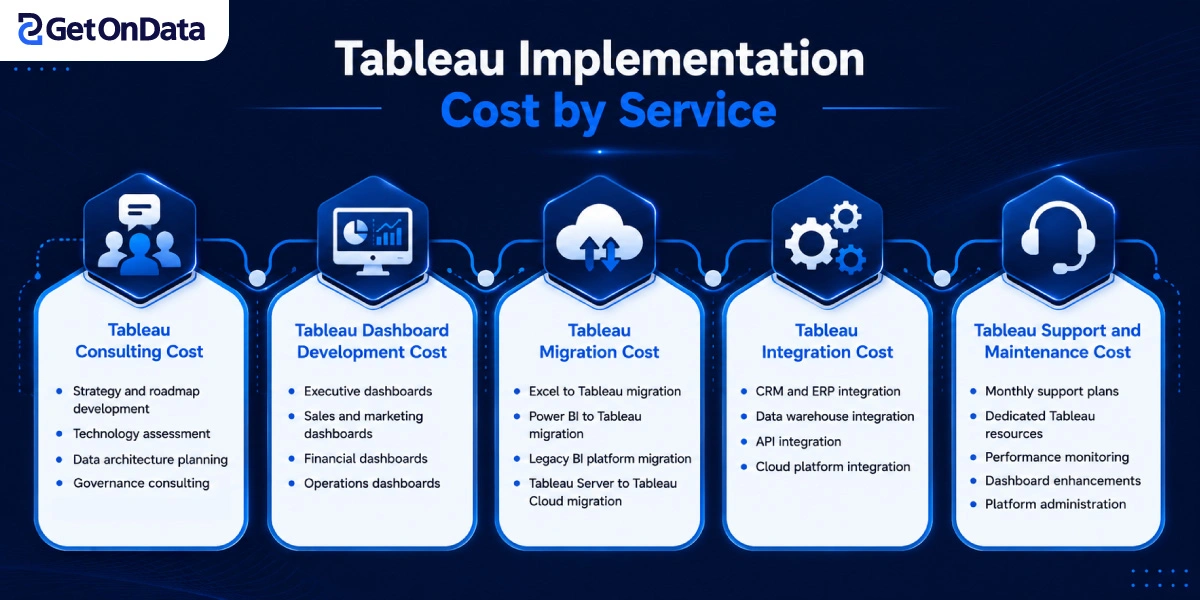
Tableau Implementation Cost by Service
➣ Tableau Consulting Cost
Business strategy, roadmap construction, tech assessments, and data architecture and governance are all example consulting costs. Organizations can set implementation objectives, lessen project uncertainty, and create a flexible analytics infrastructure that is in sync with the organization’s future strategy with professional Tableau consulting services.
➣ Tableau Dashboard Development Cost
Costs for dashboard development are based on the number of dashboards (executive, sales, marketing, financial, operational, etc.) and their complexity. These also include extensive developers and QA for interactive elements, advanced calculations, layout responsiveness, and custom visualizations.
➣ Tableau Migration Cost
Migration costs depend on the origin platform and data fidelity. Projects may range from extracting reports from Excel, Power BI, legacy BI, and Tableau Server to Tableau Cloud, with an emphasis on maintaining data fidelity and reporting integrity.
➣ Tableau Integration Cost
Costs for integration services differ depending on how many systems are linked. Examples of these systems are: CRM, ERP, cloud systems, APIs, and enterprise data warehouses. Integrations that are more complicated will most probably need custom development and authentication, data mapping, and intensive validation that will all need to be done before deployment.
➣ Tableau Support and Maintenance Cost
Costs for support and maintenance incorporate monthly service plans, Tableau specialists, and monitoring, updating, and reconfiguring dashboards and the Tableau server. Though it is a great ongoing investment, support service helps the Tableau server remain reliable and secure, and continue excellent reporting regardless of changes in the requirements of business.
Tableau Cloud vs Tableau Server Cost Comparison
✦ Tableau Cloud Implementation Costs
With Tableau Cloud, the initial spending is usually smaller, since the whole infrastructure side is managed by Tableau itself. Most companies end up paying subscription-based fees, while still getting a more rapid deployment, constant upgrades automatically, and simpler upkeep, plus less admin hassle overall.
✦ Tableau Server Implementation Costs
Tableau Server needs a higher initial investment due to server infrastructure, software installation, setup, security governance, and then the usual ongoing admin work. Still, it gives better control over data, allows more personalization, and supports compliance needs for organizations that have very tight rules, like strict governance policies.
✦ Which Deployment Option Is More Cost-Effective?
The most cost-effective option really depends on how big the business is, its security requirements, internal IT skills, scalability targets, and long-term ownership costs. When teams partner with an experienced Tableau consultancy, it’s much easier to compare deployment options, like deciding between approaches, and land on the most suitable implementation route.
Tableau Implementation Pricing Models
➞ Fixed-Price Implementation
A fixed-price setup is usually the best fit when the project has clearly defined requirements, time windows, and tangible deliverables. It gives you a more predictable Tableau implementation price, so planning and budgeting become easier, yet if the scope shifts a lot, then you may need extra agreements and adjustments to the total project cost.
➞ Time-and-Material Pricing
This pricing model works well for projects where the requirements keep changing, or business priorities evolve over time. Essentially, the organization pays for the actual hours, the resources, and the specific expertise that actually got used. It offers more flexible control to respond to new features, and also to deal with implementation changes, with less hassle.
➞ Dedicated Tableau Team
Having a dedicated team model fits best for long-term analytics efforts where you need ongoing growth plus guidance from experts. In practice, companies get a set of dedicated developers, architects, and consultants who focus on project delivery. The whole thing runs on a monthly resource-based arrangement, so the support stays steady.
➞ Tableau Managed Services
With managed services, you get ongoing platform administration, technical assistance, dashboard enhancements, performance optimization, and security monitoring. Basically, this setup helps keep the Tableau environment reliable and secure, while staying in step with changes in business needs and reporting requirements.
Hidden Costs of Tableau Implementation
⇒ Poor-quality or unstructured data
Incomplete, duplicate, or inconsistent information usually needs a lot of cleansing, transformation, and validation before it can actually be put to work. That extra work feels like it slows everything down a bit; it adds more development time, delays the deployment, and it also pushes the overall project costs higher.
⇒ Additional licenses
As more employees, teams, or outside users require access, organizations might have to buy more Creator, Explorer, or Viewer licenses. So annual subscription expenses can increase more than what was planned in the original deployment budget, sometimes without anyone noticing at first.
⇒ Infrastructure upgrades
The existing environment of servers, storage, and cloud may need to be upgraded to provide more scalable data with dashboards that are more performant with a higher volume of users and reliable systems after go-live.
⇒ Project scope changes
Increased development, testing, or project management needs due to new reporting requests, added dashboards, or unexpected requests that occur during the implementation lead to a cost increase and a longer time for implementation.
⇒ Custom connector development
The need for the development of custom APIs, a custom connector, the development and configuration of authentication, and the ongoing support associated with the effort increase the technical scope of the project and are required when Tableau is integrated with proprietary software or unsupported business applications.
⇒ User training and adoption
Administrator training plus end-user onboarding, documentation, and change management programs will probably take extra time and budget, but they are essential for better uptake and to make sure employees actually use the dashboards properly.
⇒ Dashboard redesign
User feedback after go-live usually ends up with more dashboard tweaks, improved layout, some fresh visualizations, or added KPIs, needing extra design, development, testing, and validation, again and again
⇒ Ongoing administration
Regular platform upkeep covers user management, software updates, performance observation, troubleshooting, backup verification, plus security care, to keep the analytics environment steady, stable, and reliable for the long run.
⇒ Security and compliance updates
Organizations in regulated industries may require ongoing security strengthening, periodic compliance checkups, access control updates, and better governance tweaks to keep pace with shifting laws and industry-specific requirements.
Also Read: List of Tableau Analytics Services for Business Intelligence Success
How to Calculate Your Tableau Implementation Budget
➔ Define Business Objectives
To start, you should look at the reporting hurdles, then set measurable business outcomes, and finally decide which dashboards are most valuable to build first. When the objectives are clear and not fuzzy, you avoid a lot of unnecessary development work, speed up the implementation, and you also help maximize returns from Tableau implementation services.
➔ Estimate User Requirements
Figure out the expected number of Creators, Explorers, and Viewers while also imagining future business growth. Solid projections matter because they help set licensing obligations, plan infrastructure volume, shape security readiness, and support longer-term platform scalability, so you don’t overspend or end up with a shortage.
➔ Evaluate Data and Integration Requirements
Before you implement, you should take a look at the number of business systems, data quality, refresh frequency, and integration complexity. Projects involving multiple enterprise apps and/or having poor-quality data usually need more development, testing, and deployment effort than expected.
➔ Include Training and Support Costs
Budget for administrator training, user onboarding, technical documentation, ongoing platform maintenance, and future dashboard upgrades. Including those costs right from the start helps with user uptake; it also cuts down operational interruptions and supports long-term success after the deployment.
Why a Tableau Company Is Better Than In-House Teams
⊛ In-House Tableau Implementation
An in-house Tableau team leads to greater data and reporting control as the team can adjust to the business workflow. However, the obstacles to bringing in-house Tableau include recruiting and training the team, resulting in high costs and long delays before the team can start work.
⊛ Working with a Tableau Implementation Company
A Tableau consulting company provides certified professionals with cross-industry experience to ease and speed customized Tableau implementation. The use of proven methodologies and best practices, combined with optimizations and ongoing support, helps limit project risks and build a scalable solution.
How to Choose the Right Tableau Implementation Company?
◈ Expertise and Experience
Assess the organization’s Tableau certifications and experience in implementing Tableau across industries, as well as their documented client case studies. Having successfully completed multiple similar projects demonstrates their capability to design and implement proven, scalable, and business-centric analytics.
◈ Technical and Security Capabilities
Verify if the organization has the capability to integrate multiple complex data sources with the same level of security, governance, compliance, and performance. Strong technical security frameworks enable the secure, scalable, and consistent deployment of analytics across the enterprise.
◈ Delivery, Pricing and Support
Look at the pricing models, the implementation timelines, project scope, training, and what kind of post-deployment support you get. Picking the right partner helps optimize the cost of Tableau, so the overall solution stays scalable as business needs shift and grow.

Ready to Plan Your Tableau Implementation?
The combination of the perfect plan, the right technology, and a realistic budget is key to a successful Tableau implementation.
No two organizations are the same in the goals of their reports or in the environment in which their data is housed; therefore, a custom implementation plan is required for each organization to meet their needs and remain flexible to change for the future.
The use of an experienced Tableau consulting company can help facilitate the implementation, decrease the risks associated with it, and construct a framework that can grow with the organization in the future.
Whether you’re thinking about a new implementation, migration, or doing a platform optimization, request a tailored Tableau implementation cost estimate so you can understand your project scope, expected investment, and what the smartest path is toward a successful deployment.

